Launch Your MVP for Pennies: A Full-Stack Guide with AWS SAM & AI
In the world of startups, “sweat equity” is often your most valuable currency. You want to move fast, break things, and—most importantly—not break the bank. If you are looking to validate an idea without burning through a venture capital fund, the AWS Serverless Application Model (SAM) is your best friend.
This guide focuses on a powerful, low-cost stack that leverages AWS Lambda, Vue.js, and local development tools to get your Minimum Viable Product (MVP) off the ground.
What is AWS SAM?
The AWS Serverless Application Model (SAM) is an open-source framework that simplifies building serverless applications. It extends AWS CloudFormation to provide a simplified syntax for defining functions, APIs, and databases. In short, it lets you define your infrastructure as code (IaC) without needing a PhD in cloud architecture.
Check out the official documentation here: What is AWS SAM?
The Sweet Spot: Template 11 (Lambda + Vue.js)
When you run sam init to start a new project, you are presented with a variety of Quick Start templates. For a modern, full-stack MVP, we are zooming in on Template 11 (note: template numbers may vary slightly by version, so look for the Full Stack option with Vue.js).
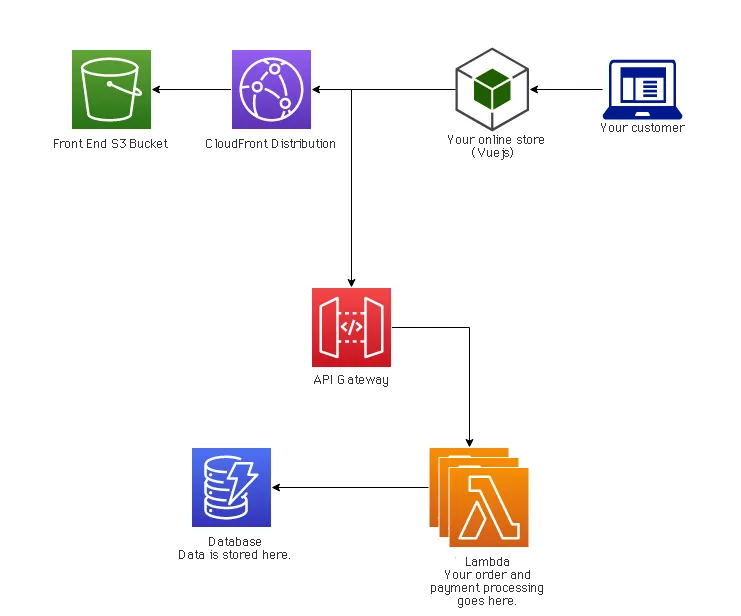
Why this stack?
-
Backend (AWS Lambda): You pay only for what you use. If no one visits your site at 3 AM, you pay $0.
-
Frontend (Vue.js): A progressive JavaScript framework that is approachable, performant, and perfect for building interactive user interfaces quickly.
-
Integration: The SAM template wires them together, handling the API Gateway configuration so your Vue.js frontend can talk to your Lambda backend seamlessly.
The Database: DynamoDB
Most MVPs need to store data. For a serverless stack, Amazon DynamoDB is the natural choice. It’s a NoSQL key-value and document database that delivers single-digit millisecond performance at any scale.
However, developing against the live cloud can be slow and cost money. The solution? DynamoDB Local.
You can run a self-contained version of DynamoDB on your laptop. This requires some basic knowledge of how document databases work (NoSQL vs. SQL), but it speeds up your development loop significantly.
How to run it:Follow the official guide to set up DynamoDB locally using a downloadable JAR or Docker:DynamoDB Local Instructions
Essential Prerequisites: Docker
To run AWS SAM locally (simulating Lambdas on your machine) and to run DynamoDB Local, you will need Docker. Docker allows you to containerize these services, ensuring they run exactly the same way on your laptop as they will in the cloud. Make sure you have Docker installed and running before you begin.
Supercharging Development with AI
You don’t need a team of ten to build a polished product anymore. You just need the right AI assistants:
-
Ideation & Design: Use Google Gemini to brainstorm features, generate logo concepts, and even design your website’s color palette and layout. It’s excellent for the creative heavy lifting.
-
Coding: Use Amazon Q directly in your IDE. It understands the AWS ecosystem deeply and can help you write the specific Lambda functions and Vue.js components you need, drastically reducing your coding time.
Need Help Launching?
Building an MVP is a journey, but you don’t have to do it alone. Whether you need help setting up your AWS environment, debugging a Docker container, or just getting that first landing page live, I am here to help.
I can help you quick-launch your MVP and establish your brand’s web presence for as low as ₹10000 per month.
Don’t let technical hurdles stop your idea. Contact me today, and let’s get building!